Tel:
Tel: E-Mail:
 English
 Chinese
 한국어
한국어
 Español




News
1. What Is a Valve Limit Switch Box?
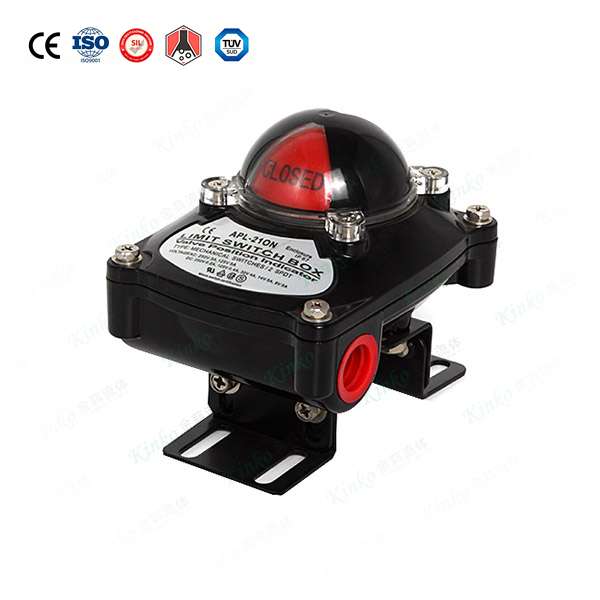
A limit switch box (also called a valve position monitor or signal box) is a device mounted on top of a pneumatic or electric actuator. Its job is to:
Sense the valve disc position (open or closed)
Transmit an electrical signal back to a PLC, DCS, or control panel
Provide local visual indication (open/closed via dome or flags)
| Feature | Purpose |
|---|---|
| Visual indicator | Red = open, Green = closed (or vice versa) |
| Electrical feedback | Dry contact or proximity sensor output |
| Weatherproof enclosure | IP67 for outdoor/washdown environments |
| Adjustable cams | Allows fine-tuning of switch activation points |
2. How Does It Work? (4-Step Operation)
| Step | Action |
|---|---|
| 1 | Actuator rotates the valve stem (90° stroke) |
| 2 | Actuator shaft drives the limit switch box cam shaft (direct coupling) |
| 3 | Cam rotates and physically depresses a mechanical switch (or triggers a proximity sensor) |
| 4 | Switch closes or opens an electrical circuit, sending a signal to the PLC |
Simple analogy: Like the door switch on a refrigerator – when the door closes (valve closed), the light turns off (PLC sees signal).
3. Types of Limit Switch Boxes (By Sensor Technology)
| Type | Sensor | Output | Best For | Cost |
|---|---|---|---|---|
| Mechanical | Physical microswitch | Dry contact (NO/NC) | Most industrial applications | Low |
| Inductive proximity | Non-contact inductive | PNP or NPN (3-wire) | High cycle life, dirty environments | Medium |
| Reed switch | Magnetic | Dry contact | Explosive atmospheres (intrinsically safe) | Medium |
| Solid state | Hall effect | PNP/NPN or 4-20mA | High precision, fast response | High |
KINKO recommendation: Mechanical switches for 90% of applications. Proximity sensors for >500,000 cycle/year duty.
4. Electrical Output Types Explained
| Output Type | Signal | Wiring | PLC Compatibility |
|---|---|---|---|
| Dry contact (SPDT) | Open or closed circuit | 2 wires per switch | Any (voltage-free) |
| PNP (sourcing) | +24V when active | 3 wires (brown, blue, black) | Siemens, Allen Bradley, Omron |
| NPN (sinking) | 0V when active | 3 wires (brown, blue, black) | Japanese PLCs (Mitsubishi, Keyence) |
| 4-20mA | Continuous position feedback | 2 or 4 wires | Analog input modules |
Critical: Match output type to your PLC input card. PNP and NPN are NOT interchangeable.
5. Wiring Diagram (Mechanical Switch – Dry Contact)
Terminal block typical layout (2-switch box):
| Terminal | Function | Wire to PLC |
|---|---|---|
| COM 1 | Common for switch 1 | Digital input common |
| NO 1 | Normally open (closed when valve open) | PLC input (open signal) |
| NC 1 | Normally closed (opens when valve open) | Optional alarm |
| COM 2 | Common for switch 2 | Digital input common |
| NO 2 | Normally open (closed when valve closed) | PLC input (closed signal) |
| NC 2 | Normally closed (opens when valve closed) | Optional alarm |
Simple 2-wire per switch configuration:
| Signal | Connection |
|---|---|
| Valve open feedback | COM 1 → PLC common; NO 1 → PLC input 1 |
| Valve closed feedback | COM 2 → PLC common; NO 2 → PLC input 2 |
No external power needed for dry contact switches – PLC provides low-voltage (typically 24V) across the contacts.
6. Mechanical Switch vs. Proximity Sensor Comparison
| Criteria | Mechanical Switch | Inductive Proximity |
|---|---|---|
| Contact wear | Yes (moving parts) | No (non-contact) |
| Cycle life | 1–5 million cycles | 10+ million cycles |
| Response time | 5–10 ms | <1 ms |
| Vibration resistance | Moderate | Excellent |
| Cost (per switch) | $5–15 | $15–30 |
| Requires power | No (dry contact) | Yes (10-30V DC) |
| Suitable for ATEX | Yes (hermetically sealed) | Requires intrinsic barrier |
7. Setup & Calibration Procedure (3-Switch Box Example)
| Step | Action |
|---|---|
| 1 | Mount limit switch box on actuator ISO 5211 pad (4 screws) |
| 2 | Apply air/electric power to move valve to fully closed position |
| 3 | Rotate cam 1 until switch clicks. Tighten cam screw |
| 4 | Move valve to fully open position |
| 5 | Rotate cam 2 until switch clicks. Tighten cam screw |
| 6 | Cycle valve 3 times. Verify PLC receives correct signals |
| 7 | If using third switch (mid-position), set at 45° with valve half open |
Typical cam arrangement:
| Cam | Function | Activation Point |
|---|---|---|
| Cam 1 (bottom) | Valve closed switch | 0° ± 3° |
| Cam 2 (middle) | Valve open switch | 90° ± 3° |
| Cam 3 (top) | Mid-travel / alarm | Adjustable (e.g., 45°) |
8. Visual Indicator (Dome / Flag Colors)
Standard color conventions (can be reversed by rotating dome 180°):
| Valve Position | KINKO Standard (Dome) | KINKO Standard (Flag) |
|---|---|---|
| Closed | Green | Green |
| Open | Red | Red |
| Transitioning | Yellow (if equipped) | Yellow (if equipped) |
Field tip: Always verify actual valve disc position before trusting indicator – cams can slip.
9. Selection Guide: Which Limit Switch Box Do You Need?
| Question | Answer → Recommendation |
|---|---|
| Budget sensitive? | Yes → Mechanical switch, plastic enclosure |
| Outdoor or wet area? | Yes → IP67 or IP68, stainless steel or coated aluminum |
| Explosive atmosphere (Zone 1/2)? | Yes → ATEX certified, intrinsically safe |
| High cycle duty (>500k/year)? | Yes → Inductive proximity sensors |
| Need continuous position feedback? | Yes → 4-20mA position transmitter (not just open/close) |
| Food/pharma washdown? | Yes → Stainless steel enclosure, sealed connectors |
10. KINKO Limit Switch Box Specifications
| Parameter | KINKO Standard Box | KINKO Premium Box |
|---|---|---|
| Enclosure material | Aluminum (coated) or PA66 (plastic) | Stainless steel 316 |
| Enclosure rating | IP67 | IP68 (submersible) / IP69K (washdown) |
| Switches | 2x SPDT mechanical (5A/250VAC) | 2x proximity PNP or NPN |
| Visual indicator | Dome type (red/green) | Dome or flag type |
| Cable entries | 2x PG13.5 or M20x1.5 | 2x M20 + brass glands |
| Temperature range | -25°C to +80°C | -40°C to +120°C |
| ATEX option | No | Yes (Ex db IIC T6) |
| Mounting standard | VDI/VDE 3845 (NAMUR) | VDI/VDE 3845 |
11. Troubleshooting Table
| Problem | Likely Cause | Solution |
|---|---|---|
| No signal at PLC | Wiring loose or wrong terminals | Check continuity with multimeter |
| Signal stuck ON | Cam screw loose; cam rotated | Re-calibrate cams |
| Intermittent signal | Mechanical switch failing | Replace microswitch |
| Indicator shows open, valve closed | Cams misaligned after actuator service | Re-calibrate limit switch box |
| No visual color change | Dome not engaged with cam shaft | Reinstall dome, align slot |
| Proximity sensor always ON | Wrong sensing target type (metal required) | Use mechanical switch or ferrous target |
12. When to Add a Limit Switch Box
| Actuation Type | Limit Switch Box | Reason |
|---|---|---|
| Manual handwheel | Not needed (visual only) | No remote feedback required |
| Pneumatic actuator | Strongly recommended | Remote indication only way to confirm position |
| Electric actuator (on-off) | Built-in (most models) | Check if auxiliary limits are included |
| Electric actuator (modulating) | Feedback from positioner | Modulating actuators already send 4-20mA position signal |
Note: Some electric actuators have built-in limit switches. Add an external box only if you need additional contacts or visual indicator.
KINKO Limit Switch Box Offerings
| Model | Type | Enclosure | Sensors | Best For |
|---|---|---|---|---|
| KLS-100 | Economy | PA66 plastic | 2x mechanical | Indoor, dry area |
| KLS-200 | Standard | Coated aluminum | 2x mechanical | General industrial |
| KLS-300 | Premium | Coated aluminum | 2x proximity (PNP/NPN) | High cycle duty |
| KLS-400 | Marine/ATEX | SS316 | 2x mechanical (ATEX) | Offshore, Zone 1/2 |
| KLS-500 | Washdown | SS316 | 2x proximity (IP69K) | Food, pharma |
Need a limit switch box for your KINKO actuated valve? Specify actuator type, environment, and PLC input type – we pre-configure and test before shipping.
Ivan (Mobile:+86-18968769287)
WhatsApp:+86-13579991606
Wechat:+86-18968769287
Website:www.kinko-flow.com
ZHEJIANG KINKO FLUID EQUIPMENT CO.,LTD

 info@kinko-flow.com
 +86-133 5611 9006